Showing posts with label rayarakula karnakar. Show all posts

Saturday, May 5, 2018

Kaala Movie Style Font Generator for all Hero's Styles

Kaala Movie Style Font Generator for all Hero's Styles

              To Change Your Name like The font style of Upcoming Super Star Rajini Kanth's  Kaala. But this is available for Special Hero's Like Rajini kanth, Allu arjun, Mahesh Babu, NTR, Prabhas, Vijay, Ajith Surya and Our Favorite Pawan Kalyan. If you want to make your name like Style of all the actors with your name. Simple i am giving to instructions here just follow that.
                 In this below link you can get the two form i.e. Name . Just You need to type your name for output. after typing just click Select Style  of our Heros. presently there are total 10 Hero's Styles. You Need to select Your Favorite Hero style and  finally click on SUBMIT  button that is it. The output of your name will be made like Kaala movie font style with your Star Hero Logo output to you.  The link is given below
Change Your Name

In the above link you will get the your name like Your Star Heros Style with your name like Kaala font. Almost 10 super starts styles are there, select one by one and make all types of Styles. And don’t forgot to express your feeling with me . must comment your opinion on my website ..


More
Thank You
Karnakar
9014819428

Sunday, April 22, 2018

How to Type Telugu with Anuscript Manager part 3 (Roma) windows 7 8 10

How to Type Telugu with Anuscript Manager part 3 (Roma) windows 7 8 10


Some people ask me that they are not able to type few letters like  1, Gru, Gna, Ini and so on. They have told the problem in comment boxes also. To help those who are not able to type or write those letters I have again clearly explained in the below video called Anuscript Manager Part 3. 
           To how to type those letters by using the key board of ROMA. So friends go through this video and start learning how to write the words you are not able to type. I think this video will be useful for ever and further any more doubts please feel free to ask me. I am always there to clarify your doubts and help and support


(if links are not worked, call me or message me or comment ,I definitely update the link)

Thank You
Karnakar
9014819428
www.facebook.com/heerasolutions

www.facebook.com/groups/PCSolutions4u/

Thursday, April 19, 2018

set Custom Ringtone for spcific contact android one mobiles

How to set Custom Ringtone for spcific contact 

In the Android one Mobiles Oreo (8.0) operating system or Nougat(7.0) Operating system there is no option for Set Custom Ringtone to a specific contact. SO that i created a video about this topic. In the video you will found the solution for this problem. 
           This is the video is for full explanation of Andriod one Mobiles custom ringtone for a contact.. If you like this video then comment your opinion on the video. and tell me How is My editing. so  I am waiting for your comment or reply. or have any doubts call me 9014819428 

Thank You
Karnakar
9014819428

Sunday, April 15, 2018

Whats App New Locked Voice Recording

Whats App New Locked Voice Recording 
 Whats App New Feature very Usefull for every user of Whats App. That is Locked Voice Recording Feature. This features is very helpful for those are use regularly voice chat. i explaned everything how to do that and how to use this features with neat explanation to understand each and every person.
           This is the video is for full explanation of New Feature Locked voice Recording. If you like this video then comment your opinion on the video. I am waiting for your comment or reply. or have any doubts call me 9014819428 
Watch in Youtube
Thank You
Karnakar
9014819428

Friday, April 13, 2018

How to Make Ringtones using Application Full Review on Contus Trim & Tone

How to Make Ringtones (Contus Trim & Tone)


 Ringtones are very famous now a days. there are so many websites available in the internet they are serving up to date ringtones. So here I am going to Give a Full review on a Application which is best ever green application in my point of view.
           This is the video is for full review of the application which have two options like Tone maker and Tone Mixer. If you like this video then comment your opinion on the video. I am waiting for your comment or reply. or have any doubts call me 9014819428 

Thank You
Karnakar
9014819428

Tuesday, April 10, 2018

RAJINI KANTH'S ROBOT 2.0 Movie Title Generator With Your Name

RAJINI KANTH'S ROBOT 2.0 
Movie Title Generator With Your Name 
                    To Change Your Name like The font style of Upcoming Super Star Rajini Kanth's  ROBO 2.0. If you want to make your name like Style of This Movie font. Simple i am giving to instructions here just follow that.
                 In this below link you can get the two form i.e. Name . Just You need to type your name for output. after typing just click Select Style presently there are total 11 styles.You Need to select one style and  finally click on SUBMIT  button that is it. The output of your name will be made like RANGASTHAM movie font style and give output to you.  The link is given below
Change Your Name

In the above link you will get the your name as ROBO 2.0 movie style. Almost 11 styles are there, select one by one and make all types of Styles. And don’t forgot to express your feeling with me . must comment your opinion on my website ..


More
Thank You
Karnakar
9014819428

Friday, March 16, 2018

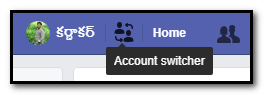
Facebook New Feature : Easy Switch Account

=======Facebook New Feature :  Easy Switch Account=======
         
         Facebook give a new simple feature but it’s very useful. That is Switch account. Actually almost 80% of people accessing their Facebook in Facebook application in mobile only. And some more members using their personal computer with saved password. That means they don’t logout. And no need to enter password again and again.  So the Facebook members will forgot password of them. Almost 50 % of people losing their account because forgot of their password.

So that’s way the Facebook give an wonderful option this is very use full for two are more members using Facebook in one desktop. This option will allow to without logout we can access another account of Facebook.

Sunday, March 4, 2018

How to Solve Photoshop CS (8.0) Hangs

How to Solve Photoshop CS (8.0) Hangs 
Reading Text Global Resources ..... Done

 The Adobe Photoshop 8.0 or Photoshop CS (8.0) Hangs while opening at the Reading Text Global Resources........Done. for this error some people are uninstall the Photoshop and install again it or Rest the Photoshop Program . but this is not correct way actually this problem is very simple and fact. first of all you need to know what is happening. so I am going to tell you how to solve this problem.
           This is the video for solving of this problem must watch and solve the problem and comment your opinion on the video. I am I am waiting for your comment or reply. or have any doubts call me 9014819428 


Thank You
Karnakar
9014819428

Tuesday, February 13, 2018

How to Create Touch Image on Whats App Using Photoshop

How to Create Touch Image on Whats App Using Photoshop

 In the Whats app the touch here images are very famous. On the any occasions you will get touch images in your Whats app. The special of this image is it will be seem touch in the Whats app when you open the image it will relieved the original content like a wishes or surprises etc. this type of images are very popular in social media.
          Then some peoples are asked to me to “ I want a touch image to surprise my girlfriend or friend.” So thought why not to teach him to create this type of image. if I teach them how to create the touch image then he will also create many of those. So lot of applications is there to create this type of image but we can’t design like our decision. So my thought is going to be finally making this video. This video explains you How to create Touch Here Images Using Photoshop. So Watch the video given below and don’t forgot to give your opinion in the comment box

Thursday, November 23, 2017

Power Star Pawan Kalyan 25 Movie Title Generator With Your Name (PSPK25)

This Post especially for Powerstar Pawan kalyan
Jai Pawanism 
Power Star Pawan Kalyan 25Movie Title Generator With Your Name               To Generate Your Name like The font style of Upcoming Power Star Pawan Kalyan's 25th movie PSPK25. This Style is too simple but stylish title style . if you want to make your name as Style of This Movie font. Simply follow the Instructions given by Us. 


In this below link you can get the two form i.e. Name . Just You need to type your name for output. after typing just click Select Style (Default or Style1) there are Presently 2 styles are there.after the selection of your style, Just you need to click on SUBMIT  button that is it. The out of your name will be made like PSPK25 movie font style and give output to you.  The link is given below
GenerateYour Name
In the above link you will get the your name as PSPK25 movie style. If you want another one with another background you can change  your background by click style numbering. And don’t forgot to express your feeling with us. must comment your opinion on my website ..

This style is also especially given for girls that is MCA (Middle class Ammayi. )
More
Thank You
Karnakar
9014819428

Sunday, June 18, 2017

Happy Father's Day


Happy Father's Day 


Celebrations of International Father's Day! I am giving some images to send to your time line or sharing with friends or sharing with facebook,twitter, instragram etc...
This is My Post 
Just tap on my post, it was open my post and just tap on select photo your own and send to your friends 

Happy Father's Day.....

Thank you 

Friday, June 9, 2017

Telangana State Board of Intermediate Education Advance Supplementary Examination Results May/June - 2017

Telangana State Board of Intermediate Education
1st Year & 2nd Year Advance Supplementary Vocational Examination Results May/June - 2017


Download Intermediate Results
Telangana State Board of Intermediate Education ,Hyderabad


The intermediate exams Results out Today 17-04-2017. So if you want to See Your Results you can See from the website of intermediate state board of Telangana. 1st year & 2nd year Results available.

Results
1st Year Results
2nd Year Results
For More Vist Website : Official Website
Hurry Up !
Thank You 

 Rayarakula Karnakar 
9014819428
rayarakula.karnakar@gmail.com

Wednesday, May 3, 2017

SSC 10 th Class Results Available Here | Telangana

SSC 10 th Class Results Available Here
Download SSC Results
Telangana State Secondary school of certificate ,Hyderabad


The SSC 10 th class Results out Today 03-05-2017. So if you want to See Your Results you can See from the official website of SSC state board of Telangana. Results available. Here

Results
SSC Results Click Here
For More Vist Website : Official Website
Hurry Up !
Thank You 

 Rayarakula Karnakar 
9014819428
rayarakula.karnakar@gmail.com

Saturday, April 29, 2017

Neat Image Plugin For Photoshop

Neat Image Plugin For Photoshop 
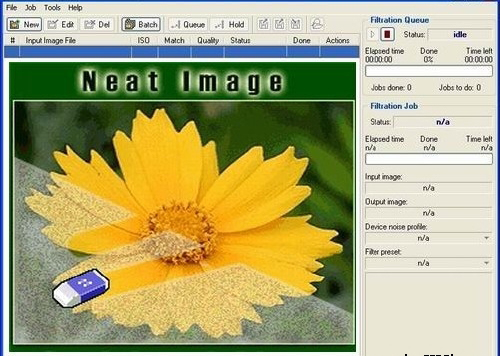
           Neat image plugin for Photoshop all versions. It’s very simple to clean your photos from Noise. Reduce Noise using the Neat image Plugin, and it is very simple to install it just install setup file and choose whatever maybe your Photoshop. The download link is given below:
 Download Here
Neat image plugin for Photoshop all versions. It’s very simple to clean your photos from Noise. Reduce Noise using the Neat image Plugin, and it is very simple to install it just install setup file and choose whatever maybe your Photoshop
To install Neat Image plugin manually
Traditional Method:
            Go to the C:\Program Files\Neat Image\ and Copy the NeatImage.8bf and go to c:\Programfiles\Adobe\ Photoshop (whatever you’re using)\plugins and paste here. Then open your Photoshop and go to filter menu you can find it at last.

Method 2:
                    Open Your Photoshop, go to the Edit menu, and open Preferences >> Plug-ins and Scratch Disks and set Additional Plug-ins Directory to typically, C:\Program Files\Neat Image\. Then open Photoshop and you can find it in filter menu.

Sunday, April 16, 2017

Facebook Happy Easter! Holiday cards


Facebook Happy Easter! Holiday cards

Celebrations of Easter! You have to send a greeting card to your family or friends, the Facebook give an opportunity to send the card to your friend Facebook will show a preview to Share Your Card. Like this image showing you. Just click on share a card of own and enjoying the cards. 

You will see the next page with almost 8 different types of cards and with animations that means it was animated moving objects. Whatever may be you can select and preview it. After completion of your selection just click on share, that is it... The card come with a post. Want to write something then you can write in your post and post it will look like your post and below of the post the small link will be declared to do same thing others... 
Like below image
Others just tap on select card then others can also have a card to share their friends...  Got it. 
Then why are you waiting just tap on Facebook select your card and share your wishes to others... share to me also.

This is My Post 
Just tap on my post, it was open my post and just tap on select card your own and send to your friends 

Thank you 

Friday, March 31, 2017

Facebook Background Color Posting now available in PC

Facebook Background Color Posting now available in PC
Background colored post was released on 01-01-2017 but that days its only available in mobile phones only, But now this feature introduced in Facebook Web for PC also .. Now its a new way to post status with attraction of people, But it's only for status but not taken photos or videos carry with this.
Facebook Colors
 Facebook is rolling out this feature Computer users also. To try this one, just click the box that says "What's on your mind?" to post or share something to your news feed, there You will see background color option click on it now you can see different color options appear below your text; now just choose or select a color to add it as your background.