Showing posts with label facebook application. Show all posts

Saturday, June 16, 2018

Facebook Ramadan /Ramzan/ cards 2018


Facebook Ramadan /Ramzan/ cards 2018


Celebrations of Ramadan Day! You have to create a card with your islamic picture and share it on Facebook.  send a greeting card to your family or friends, the Facebook give an opportunity to send the card to your friend Facebook will show a preview to Share Your Card. Like this image showing you. Just click on share a card of own and enjoying the cards. 

     just click on share, that is it... The card come with a post. Want to write something then you can write in your post and post it will look like your post and below of the post the small link will be declared  that is create a post to do same thing others... 
Then why are you waiting just tap on the below given link. it will take to you facebook ramadan day cards page. Select your card and share your wishes to others... share to me also.

Happy Ramadan.....

Thank you 

Sunday, May 13, 2018

Facebook Happy Mothers Day Custom cards 2018


Facebook Happy Mothers Day Custom cards 2018
Celebrations of mothers Day! You have to create a card with your mom picture and share it on Facebook.  send a greeting card to your family or friends, the Facebook give an opportunity to send the card to your friend Facebook will show a preview to Share Your Card. Like this image showing you. Just click on share a card of own and enjoying the cards. 

    In the below link you have total 6 different types of cards in that 1 is text card. and 2 are custom photo upload card and 1 is animation card and remaining 2 are normal cards. Whatever may be you can select and preview it. if you select above mentioned custom type of image you need to upload one picture in it and After completion of your selection and upload  just click on share, that is it... The card come with a post. Want to write something then you can write in your post and post it will look like your post and below of the post the small link will be declared  that is create a post to do same thing others... 
Then why are you waiting just tap on the below given link. it will take to you facebook mothers day cards page. Select your card and share your wishes to others... share to me also.

Happy Mothers Day.....

Thank you 

Monday, April 30, 2018

Buddha Purnima Greetings from Facebook

Buddha Purnima Greetings from Facebook

“All of us at Facebook extend warm wishes to Buddhists around the world as you honor the birth, enlightenment and passing of Buddha.”
Facebook Greetings for the festival and celebration of Buddha Poornima on today. Today is the Buddhist festival that marks Gautama Buddha's birth, enlightenment and death.It falls on the day of the full moon in May and it is a gazetted holiday in India. .


           So then share to your greetings to your friends. Just click on below my post link and share to click on share button and share to your timeline 


My post
 Note: My post link is the post of mine.  and some more post like this please keep visit rktechnics or contact me 9014819428

Friday, March 16, 2018

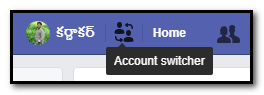
Facebook New Feature : Easy Switch Account

=======Facebook New Feature :  Easy Switch Account=======
         
         Facebook give a new simple feature but it’s very useful. That is Switch account. Actually almost 80% of people accessing their Facebook in Facebook application in mobile only. And some more members using their personal computer with saved password. That means they don’t logout. And no need to enter password again and again.  So the Facebook members will forgot password of them. Almost 50 % of people losing their account because forgot of their password.

So that’s way the Facebook give an wonderful option this is very use full for two are more members using Facebook in one desktop. This option will allow to without logout we can access another account of Facebook.

Friday, February 9, 2018

The 2018 Winter Games are starting!


Facebook Winter Olympics Post


  The 2018 Winter Games are starting!
As the world's greatest athletes compete in South Korea, all of us at Facebook hope that you enjoy the games with friends and family.
        Celebrations of PyeongChang 2018 Olympic Winter Games! You have to share greetings to our athletics, the Facebook give an opportunity to share the Greeting Animation card on your Facebook timeline if you click on my post link there have a share button just click on that. 
This is My Post 
Must wish our all athletics for the winning.share to your family and your friends for watching the games with enjoyments.. 
support all..

......All the Best.....

Thank you 

Monday, February 5, 2018

Share Facebook Friends Day Video and Awards To Your Friends

Facebook Friends Day Video and Awards

Happy Friends Day ...........................!
Here Facebook celebrations started with a Video and Awards to your favorite friends.. You must share your Friends Day video to Your Friends and Share personal awards to him/her. This awards section is very special for this year and this anniversary. Amazing Advanced feature for Express your feeling about your friend.
            
                   Then why are your waiting .......... click on Below link it will automatically generate a video for you and you can watch the video and slide the video you have award to create. Just click create button and create some award who are special for you. then share personally on timeline or Message.
The video is automatically ready made for share on your time line in the beside picture you can watch. if you slide the video there you can found some awards like . you loved most that means who reacts love mostly on your posts. not only that there are separate awards which is shown in the video. you can share personally to your friend timeline or personal message to him/her. 

The most advanced excellent feature is create. This feature is give create own award to your friend that means you can create a award for everyone in your facebook frineds list. in this feature just you need to click on the tumbnail and there will show your frineds list you must select one of them and automatically the photo will appear on the award . if you want to change his/her photo just click the change photo option on the tumbnail it directly shows the profile pictures of your frined . select one . now its time to select a best award for him/her. almost 24 awards are there to select the best suitable award for them. the awards are given below .

After selecting award the award generated with selected person now you can share to your friends. If you satisfied for this post. please comment your opinion about my website .. 
Hurry Up !
Here is the My Friends Day Video : click here 
Thank You 

 Rayarakula Karnakar 

9014819428

rayarakula.karnakar@gmail.com


Friday, January 26, 2018

Snooze Time Feature in Facebook

Facebook New Feature “Snooze”
                   Frustrated on friend’s non-stop same photos? Bored of seen business Page’s? So Now Facebook has Sick off all these, Launched a Snooze button that lets you temporarily unfollow your friends, Groups, Pages for 30 days.The Snooze button used for stop unknowing things from your friends or else, To Snooze Posts of someone or Groups or pages Just you need to tap the drop-down arrow in the top right of post. Here’s Snooze button as your seems like beside picture. Tap that Snooze someone for a 30 days. the snooze option is the best feature in Android Oreo. this feature is Secure your Facebook

                     With Snooze Option, You have to found a way to reduce the noise from a always Online fully Posted person, group or Page. This is the best way to use Facebook for free of enjoyment.  Presently the Facebook over world and the people don’t know who is the person they maintaining friendship. And some people are opening Facebook for only chat unknowns. So this feature is very helpful to relief.

                      Pages and Groups may stop sharing more thing because people may snooze their posts. So pages admins should not overshare or doing spams. from Snooze feature could reduce the chances of someone unliking the pages or leaving the groups because there is snooze option.


After the reading the post must comment your opinion and your suggestions, these suggestions and opinions are very good for me and its very important for our website and your service
For any Help
Rayarakula Karnakar
9014819428

Monday, December 25, 2017

Facebook Merry Christmas cards


Facebook Merry Christmas cards


           Celebrations of Christmas Season! You have to send a greeting card to your family or friends, the Facebook give an opportunity to send the card to your friend And your own timeline. Facebook will show a preview to Share Your Card. Like this image showing you. Just click on share a card of own and enjoying the cards. 
You will see the next page with almost 5 different types of cards and with animations. Whatever may be you can select and preview it. After completion of your selection just click on share,. The card come with a post with celebrations of Season. 
Others just tap on select card then others can also have a card to share their friends...  Got it. 
Then why are you waiting just tap on Facebook select your card and share your wishes to others... share to me also.  if you have mobile device then you have special option that is custom photo for celebrations of Christmas. you can see the below image 


You can share your Cards to your own timeline or friends by clicking below link.

This is My Post 
Just tap on my post, it was open my post and just tap on select card your own and send to your friends 

Special Note: In Mobile devices this feature is available with custom photos. 


Merry Christmas....

Thank you 

Monday, December 18, 2017

Facebook Cristmas holiday cards

Facebook Cristmas holiday cards
celebrations of Tis the Day ! christmas you have to send a greeting card to your family or friends, the Facebook give an opportunity to send the card to your friend Facebook  will show a preview to share your card own. Like this image showing you. just click on share a card of own and enjoying the cards. 
          You will see the next page with almost 20 different types of card and with animations that means it was animated moving objects. what ever may be you an select and preview it . after completion of your selection just click on share, that is it .. the card come with a post . want to write something then you can write in your post and post it it will look like your post and below of the your post the small link will be declared to do same thing others .. 
like below image
Others just tap on select card then others can also have a card to share their friends ..  got it. 
then why are you waiting just tap on facebook select your card and share your wishes to others... share to me also .
-
Just tap on my post, it was open my post and just tap on select card your own and send to your friends 

Thank you 


Sunday, December 17, 2017

Facebook Year In Review 2017

Facebook Year In Review 2017
Wahoooooooooooooooooooooooooooo....
      Finally 2017 Facebook Review Video is Came. This Video Remind Most memorial Movements in the Year 2017.  This video for Every user of Facebook. If you want to Share your 2017 Review video to Your Friends then click on Below link and Watch Your 2017 Facebook Memorial Movements and Share your Video to Your Facebook Friends
 The Facebook automatically Made a Video with Best movements of the year and Best posts, Photos, Likes etc... done in 2017... Hope You enjoy the Video  

And In this review if you want to change some photos then edit option is also Available you can edit Your video as you like. Your can edit like posts you need to use in that video and the best movement in this year etc..   

Don't Forgot to comment your feeling in this website.. 


Hurry Up !

Thank You 
 Rayarakula Karnakar 
9014819428
rayarakula.karnakar@gmail.com

Sunday, December 10, 2017

Human Rights Day Facebook Frames Day for Unity


Human Rights Day Facebook Frames

Celebrations of  Day for Unity Girl! You have to put your profile picture as unity Frame, The Facebook give an opportunity to put the frame on your profile picture. Like this image showing you. Just click on set a frame on your own profile picture and enjoy the frames. 

Just click on the Add Profile Frame. it will show the preview. After that just click on OK then it will directly set the profile picture with the frame. Want to write something you can write in your post... 
 I am giving the link of Day for Unity Frame for your profile picture just click Add Profile Frame below link and Set your profile picture with the celebrating Human rights Day with hand symbol.

This is My Post 
Just tap on my post, it was open my post and just tap add Day for Unity profile frame. 

We believe that support for dignity and respect can make a difference in our communities. Join us in observing Human Rights Day and spreading hope for equality around the world.
Thank you 

Thursday, December 7, 2017

Best ways to Protect your Facebook from hacking

Keep your Facebook Safe
          Safe your Facebook for secure your data and information. To check your account is safe or not then I will give the link to you and here we are going to tell some the best ways to protect your Facebook account. I f you did like to learn something best practices about creating a secure password.
Secure Password
                   If you are created the best right password it will make you can login in to your account securely and happily. And help to keep thieves out. Your Facebook is your family, friends, happy, sadness, everything.
Memorable
                       Make your password be unique and remember able for you ever and that is enough to don’t forget the password. That password can you remember the Facebook anywhere and everywhere. if you want to Join by know from the Facebook developers then click on the below link.
Join Facebook Team
Deferent Password
And the main point don’t your others password and that you use in other websites because it will cause for ever. If the one site was gets hacked and the password was stolen then the hacker also try in the Facebook. So don’t use passwords that already used in others social networks.

Don’t Give password to anyone


Don’t give the password anyone because it’s very dangerous for your Facebook account. The Facebook account is a type of your bank account. Banks maintains your money but Facebook maintains your freedom, your happiness, your sadness everything which is your sharing with your friends. If accidentally someone has your password then immediately change your password to can’t access by others.

Wednesday, October 11, 2017

International Day of Girl Facebook Frames


International Day of Girl Facebook Frames


Celebrations of International Day of Girl! You have to put your profile picture as Girls Frame, The Facebook give an opportunity to put the frame on your profile picture. Like this image showing you. Just click on set a frame on your own profile picture and enjoy the frames. 

Just click on the Add Profile Frame. it will show the preview. After that just click on ok then it will directly set the profile picture with the frame. Want to write something you can write in your post... 
 I am giving the link of Girls Frame of Face to your profile picture just click Add Profile Frame below link and Set your profile picture with the celebrating Peace Day.

This is My Post 
Just tap on my post, it was open my post and just tap add peace profile frame. 

Today's Girls, Tomarrow's Leaders.....
Thank you 

Thursday, September 21, 2017

World Peace Day Facebook Frames


World Peace Day Facebook Frames


Celebrations of World Peace Day! You have to put your profile picture as Peace symbol, The Facebook give an opportunity to put the frame on your profile picture. Like this image showing you. Just click on set a frame on your own profile picture and enjoy the frames. 

Just click on the Add Peace Profile Frame. it will show the preview. After that just clik on ok then it will directly set the profile picture with the frame. Want to write something you can write in your post... 
 I am giving the link of Peace Frame of Face to your profile picture just click Add Peace Profile Frame below link and Set your profile picture with the celebrating Peace Day.

This is My Post 
Just tap on my post, it was open my post and just tap add peace profile frame. 

Happy Peace Day Day.....
Thank you