Showing posts with label photos. Show all posts

Monday, August 14, 2017

INDEPENDENCE DAY SPECIAL DESIGN PSD FOR FOR YOU

INDEPENDENCE DAY SPECIAL DESIGN .psd FOR FOR YOU

              In the special day of the India . i am going to give a photo shop design that you can change as your wish . what ever may be you can type the letters in the Indian flag Design. The .Psd file (Photoshop Document ) given below . you can download from there 
    This is very simple to Edit your Name or Your wish Letter. You need to Download this .Rar file and Extract using Winrar. you can find two .psd file. The Photoshop Documents are look like above images now you need to open with Photoshop. that it now select Text tool click on the Text and Type what ever May be. and its done.. Congratulations you got it. 

Download now
Hurry Up ! Download and Create and Post in Facebook .. do not forgot to tag me . 
9014819428

Saturday, April 29, 2017

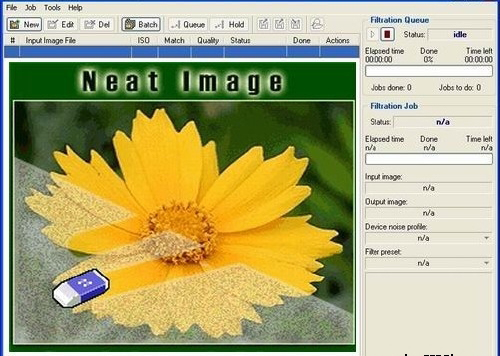
Neat Image Plugin For Photoshop

Neat Image Plugin For Photoshop 
           Neat image plugin for Photoshop all versions. It’s very simple to clean your photos from Noise. Reduce Noise using the Neat image Plugin, and it is very simple to install it just install setup file and choose whatever maybe your Photoshop. The download link is given below:
 Download Here
Neat image plugin for Photoshop all versions. It’s very simple to clean your photos from Noise. Reduce Noise using the Neat image Plugin, and it is very simple to install it just install setup file and choose whatever maybe your Photoshop
To install Neat Image plugin manually
Traditional Method:
            Go to the C:\Program Files\Neat Image\ and Copy the NeatImage.8bf and go to c:\Programfiles\Adobe\ Photoshop (whatever you’re using)\plugins and paste here. Then open your Photoshop and go to filter menu you can find it at last.

Method 2:
                    Open Your Photoshop, go to the Edit menu, and open Preferences >> Plug-ins and Scratch Disks and set Additional Plug-ins Directory to typically, C:\Program Files\Neat Image\. Then open Photoshop and you can find it in filter menu.

Thursday, April 20, 2017

Downlaod Ring Frames for Photoshop

Downlaod Ring Frames for Photoshop

Download this Ring Frames for use for Photoshop designs, This frames used for highlight the matter or any photo with Suitable Ring. This .psd will very useful forever. If you want to download this .psd file click on the given below link 
Download From here
  Rayarakula Karnakar 
   9014819428

Tuesday, April 4, 2017

Design Your Name with This Style

Design Your Name with This Style
 
Do you want to Design your name like this? Ok I will help to you .

To design this type of style Name using Photoshop any version. But you need to .psd (Photoshop Document) file for easy Making.   So that I am giving the .psd file for you. Just you need to click below link and download .rar file after download you need to extract the .rar file with WinRAR or any extractor. It will open a .psd file open with Photoshop. That’s it 

.psd file link

After edit your name with design do not forgot me upload in Facebook and tag me.


Wednesday, March 22, 2017

Tuesday, March 21, 2017

How To Reset Photoshop To Defaults


Download Photoshop
TO RESET THE PHOTOSHOP:
To restore preferences of Photoshop quickly using a keyboard shortcut Keys:
Step 1: Drag and Drop the Photoshop Icon from the start menu to the Desktop or right click on desktop>> new >> shortcut and give the path to the Photoshop
·         Step 2: Now Press and hold
Windows = Alt + Control + Shift

Mac Os = Option + Command + Shift
While starting the Photoshop. You will find a prompting to reset the Photoshop Settings. just click on OK ..
Note: if You reset the Preferences and Photoshop I will also effect on custom shortcuts, work spaces, and color settings to be reset to default.


Disable and enable warning messages
Sometimes Photoshop occurs some warning messages. And there you have a option to Do not show this. But you want to disable all the warning notification from the settings.
1.         Do any one of the following:
•           (Windows) Choose Edit > Preferences > General.
•           (Mac OS) Choose Photoshop > Preferences > General.
2.         Click Reset All Warning Dialogs, and click OK.

Tuesday, February 28, 2017

How to Make Oil Paint Effect without Graphics Card

How to Make Oil Paint Effect without Graphics Card

                      
                         In the Present photography days, the Photoshop also very popular and now a days the oil painting effects is fully popular in social networks. So, that I created a video(Oil Paint Effect in Photoshop CS5) about oil painting effect in the Photoshop CS5, but some people are suffering with doing this effects who are do not have any graphic memory in their computer. In that movement, I am posting this post to help us whose do not have graphics in their computers.


Here I am presetting a simple and small size filter its helpful for create Oil Painting Effect in the Photoshop 7.0 and later named as GREYCstoration. That means this filter works on lower version of Photoshop also.
You can download the filter of GREYCstoration from the below link.


DownloadHere
Doing In this filter you have to minimum knowledge about Photoshop. How the photo is changing and what enough it. So Now talk about filter. This filter has some form they are look like this image. If you have to learn the changing of some default values. This changes will make a good oil painting effect


You Can find the GrayStoration filter in filter>Noise> GrayStoration


After Applying filter additional Editing (optional)

    1.    Want to do Smooth Then Go to Filter >> Blur >> Surface Blur 
       (adjust by looking the image)
    2.    Sharpness from the Blur Filter >> Sharpen >> Unsharp Mask 
          (adjust by looking the image)
   3.    Take a Colorful Background image and change Blend Mode until which is most suitable for it for color effects


Watch this video to do Oil Painting effect in The Photoshop CS5

Friday, February 10, 2017

Facebook Slideshow : Create Quick Videos

Facebook Slideshow : Create Quick Videos
  Day to day Facebook going to give you to share more and more on Facebook - so it's main object to out a new feature or option designed to do something new.Facebook is now pushing an automatic quick video-maker feature called as Slideshow.Sharing videos and pics most important part of Facebook. Facebook is giving a new feature called as Slideshow.
It is an easy way to create and share the slideshows (videos). The Facebook application will sync with your phone's gallery. Simply you need to select some photos and a loveable music theme given from the Facebook. And took a beautiful title for the video. The title shown in the 1st picture of the slideshow .. 
If you satisfied for this post. please comment your opinion about my website .. 
Hurry Up !
Facebook Friends Day Video : click here 
Thank You 

 Rayarakula Karnakar 

9014819428

rayarakula.karnakar@gmail.com


Friday, February 3, 2017

Secure Your Facebook Account

Secure Your Facebook Account
            More Security features Came in Facebook ..  It will help to you secure your Facebook account from the hacking or accessing someone else. in the Facebook we are acceptably and unexpectedly giving accessing to so many applications so that if you change your password it will more secure your Facebook account from any another one access your account . a small popup will show you to change your password to secure account. just click on change your password and change your password with strong password.
After Changing your password its scan your posts, apps, phone number, email, posts, likes , comments and profile. Finally ask some changes in app activity and your activity to more secure click on continue.  
 Its show your apps using in Facebook and activity you made like comments and likes if you do not made this then select it and remove the item
Finally Your account is Full Safe and Secure 

Hurry Up ! All Happies.

Thank You 

 Rayarakula Karnakar 

9014819428

rayarakula.karnakar@gmail.com


Thursday, February 2, 2017

Facebook Friends Day Video

Facebook Friends Day Video

Friends Day Video is Came .. If you want to show your Friends Day video to Your Friends then click on Below link it will automatically generate a video for you and you can saw the video there if you want to change some photos in the video then simply click on " Edit Video " otherwise Share the video on your timeline.
After selecting photos just click on share the video then It will Take few minutes and give a Video to You. and Share to your friends. Select those Photos which represents your Friendship shown in that Video .. 
The Edit option which is used for edit the video which Photos you need to use in the video and the best Friendship Photos you can put on it ..  If you satisfied for this post. please comment your opinion about my website .. 
Hurry Up !
Here is the My Friends Day Video : click here 
Thank You 

 Rayarakula Karnakar 

9014819428

rayarakula.karnakar@gmail.com


Wednesday, December 21, 2016

Lenovo Yoga Book with Windows Yoga Book 2-in-1 Productivity Tablet

Lenovo Yoga Book with Windows Yoga Book 2-in-1 Productivity Tablet

            Mobile productivity now enters into a new era with the Latest technology and produced Lenovo Yoga Book, a book type of tablet which have  2-in-1 feature felicities like you’ve never seen this type before. Making notes work or Doing sketches work using a pen with real ink. what ever may be you write on a paper its will be on the screen. and this tablet have great touch feature that is  Type on the Halo keyboard keys that will appears  on the screen when you requires . and erase all thing when you do not need. Great things done with this familiar Windows operating environment. Its very Thin, light and stylish. Yoga Book sets your trend with the imagination free  anytime, anywhere in the world 

TECHNICAL SPECIFICATIONS

Processor Intel® Atom™ x5-Z8550 Processor(2M Cache, Quad-Core, Up to 2.4 GHz)
Operating System Windows 10 Home
Sound Dolby Audio™ Premium
Memory RAM : 4 GB LPDDR3
ROM : 64 GB
Card Slot : microSD™; Supports Up to 128 GB
Battery Type : Li-ion Polymer
Capacity : 8500 mAh
Standby Time : Over 70 Days
General Usage : 13 Hours
Dimensions(W x T x H) (inches) : 10.1" x 0.38" x 6.72"
(mm) : 256.6 x 9.6 x 170.8
Weight Starting at 1.52 lbs (690 g)
Display Size : 10.1" FHD IPS(1920 x 1200)
Color Depth : 16.7 Million
Color Gamut : 70%
Brightness : 400 nits
Touch On Screen : Capacitive Touch with AnyPen Technology
On Screen : Capacitive Touch with AnyPen Technology
Material Metal
Colors Carbon Black
Camera Rear : 8 MP Auto-Focus
Front : 2 MP Fixed-Focus
Sensors Vibrator
G-Sensor
Ambient Light Sensor
Hall Sensor
GPS
WLAN WiFi 802.11 a/b/g/n/ac
Dual Channel (2.4 GHz and 5 GHz)

Draw Like a Real Pro with Real Pen   


           Artistic inspiration strikes, Yoga Book has When your turn of the keyboard off, the Yoga book give a chance with Real Pen in the particular provided pad space this will be directly shown in the screen of the yoga book and its give you the precision and control you from a real pen on the paper.

The Real Pen detects 2,048 levels of pressure, capturing every stroke and No need to worry about lenovo yoga book batteries in the pen; because the Real Pen do not have any batteries its  works without ever needing a charge. You can create more creative by using two hands, the Photoshop worker can have more creative talent they must create more and more designs with more creative knowledge one on the screen to select tools, pan, and pinch-to-zoom, while the other hand uses the Real Pen to draw on the Create Pad.


Unleash your Imagination, Anywhere.
The lenovo Yoga book is Very slim and light weight product so every one chooses this book, when Opened its Only 4.05 mm thin, and the wait is just 690 g. and the battery charging life is 13 hours with a single charge. Do not you turn head because  your yoga book is opened. Do creative with more efficient


Saturday, December 10, 2016

Facebook Year in Review 2016

Facebook Year In Review 2016

2016 Facebook Review Video is Came .. If you want to show your 2016 Review video to Your Friends then click on Below link and tap on " Make 2016 Review Video Request" 
It will Take few minutes and give a Video to You. .. and Share to your friends . 
2016 Best posts, Likes , Photos all will be shown in that Video .. 

and there is a Edit option Available you can edit the video which posts you need to use in that video and the best movement in this year you can put on it ..  If you satisfied for this post.. please comment your opinion about my website .. 

Hurry Up !
Thank You 
 Rayarakula Karnakar 
9014819428
rayarakula.karnakar@gmail.com

Sunday, November 27, 2016

Shraddhanjali, Vardhanthi Flex Banners .psd Files

Shraddhanjali, Vardhanthi Banners .psd Files

                      If you want to change greenly background simple select green layer and control + u and change the color as you like. and this text is typed by Using Anu Script Manager so if you want to change the text 
1.  This is a Maharaja Shraddhanjali PSD file  it contain one maharaja chair and person and some text and heading and venue also 


2. This is very simple and better flex design for ashrunivali or shraddhanjali banners it contain a flower garland  Frame and some text. and greenery background 


3. This is also same type of above one but it have a small frame suitable for all. and same text and venue is also available in this psd file   


4. This file is a wall Photo Frame this contain just frame and name and a garland frame do not have any text body because it is only for wall photo frame you can change background layer and personal as your wish