Showing posts with label google products. Show all posts

Wednesday, August 8, 2018

Gmail’s biggest Interface redesign

Gmail’s biggest Interface redesign

         The world’s most popular email service is googles mail, that is gmail.com.Google email snoozing, nudging, and confidential mode making their  visual redesign for Gmail on the web. 
  • Integrated rights management
  • Two-factor authentication 
  • confidential mode
  • Email snoozing
  • Attachment showing

The view of gmail is totally changed.. here there are 3 types of view is available .. in that Default , Comfortable and finally compact. these all are fully updated features. in the default you have the attachment of the mail is out side of the mail and you can direct access are open the file which is attached 
the old look was comfortable and compact .. these are old styles.


and the finally the gmail look like 


Wednesday, September 27, 2017

Google's 19th Birthday Surprise Spinner


Google's 19th Birthday Surprise Spinner 


Celebrations of Google's 19th Birthday. Google giving a surprise spinner for all. This spinner going to give some knowledge to you and have some games also you can play in the both devices either PC or Mobile. just you need to click the google doodle it will automatically open spinner page. and its spins directly and opt a symbol and going to open that option or spin again. 

Just click on the Add Peace Profile Frame. it will show the preview. After that just clik on ok then it will directly set the profile picture with the frame. Want to write something you can write in your post... 
 I am giving the link of Google Spinner just click below link and open the spinner and know something new.

Google spinner 
Just tap on my post, it was open Google spinner. 

.....Happy Google Anniversary.....
Thank you 

Monday, May 8, 2017

New tools to shape Comments in Youtube

New tools to shape Comments in YouTube
1)                    Pinned comments: Show the Popular comment in the 1st to promote the
          comment section. This comment will help to you to  attract others
2)                   Creator hearts (Love Symbol) : Show the some heart lovable comments.
          This is the better way to comments from your community
3)                   Creator usernames: when you comment on your channel or video
          comments, your username will appear under the text with a pop of color
          around it so your viewers can easily identify the that comment is coming
           from you. If you are a verified creator, you will still have a verification
          checkmark appear beside your name.
4)                  Choose moderators: This feature is enabled in this year. This is the best
           way to maintain comments section . give permission to others called
            moderation they can maintain comments like remove the others spam
            comments
5)                   Blacklist phrases and words: You can block some words which is not
           proffered. The some words are very bad words or any violence words. These
           words fully blocked. You can block those words in the black list
6)                  Review of Hold potentially inappropriate comments:  This is
            introduced in this year. This is now in developing mode (Beta feature). If it
            is successful then it’s going to introduce in the all users
. It is  recognize  the
            algorithms will not always be accurate: the beta feature may hold some
            comments you deem fine for approval, or may not catch comments you did
            like to hold and remove. When you review comments, the system will take
            that feedback from account to into the account and get best at identifying
            the comments hold for review

Saturday, April 29, 2017

Neat Image Plugin For Photoshop

Neat Image Plugin For Photoshop 
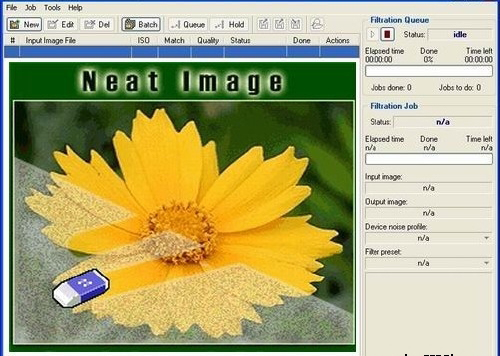
           Neat image plugin for Photoshop all versions. It’s very simple to clean your photos from Noise. Reduce Noise using the Neat image Plugin, and it is very simple to install it just install setup file and choose whatever maybe your Photoshop. The download link is given below:
 Download Here
Neat image plugin for Photoshop all versions. It’s very simple to clean your photos from Noise. Reduce Noise using the Neat image Plugin, and it is very simple to install it just install setup file and choose whatever maybe your Photoshop
To install Neat Image plugin manually
Traditional Method:
            Go to the C:\Program Files\Neat Image\ and Copy the NeatImage.8bf and go to c:\Programfiles\Adobe\ Photoshop (whatever you’re using)\plugins and paste here. Then open your Photoshop and go to filter menu you can find it at last.

Method 2:
                    Open Your Photoshop, go to the Edit menu, and open Preferences >> Plug-ins and Scratch Disks and set Additional Plug-ins Directory to typically, C:\Program Files\Neat Image\. Then open Photoshop and you can find it in filter menu.

Google Roll Out New Sign in Looks in GMAIL

Google Roll Out New Sign in Looks in GMAIL 

Google launches New Login (Sign in) and Sign Up Look in the Gmail. This type of login used for all the applications (products) of the Google. 
when you enter into the gmail login page The google logo will show the small animation which will tell us to this login for all products of google. like it will show the application and converted in to google logo. This type of login simple look with the white forms. the first form is Enter your Email or Phone number then press enter or click on next button. then you should have to enter your password in the password form. that's it it will login into your account. 


This login have fully security features.and this login is very fasted and easier for all devices . this changes will easier to every one. This changes was improved since one month and finally we got the new of the google sign in. and if you want to login into your account with the new looks just use below link 


 This is the image showing that the gmail was previewed with previously logged person after logout its will ask like this if you are the same person just enter password go forword if your not just clik on ^ button and use another account . and if you have any trouble in sign in of your account just click on other options in the bottom of the page and solve your problem. This is very help full for android users 

Thank you Google
-Karnakar