Showing posts with label web. Show all posts

Tuesday, April 4, 2017

Download Different Type of Fonts

Download Different Type of Fonts
Do you know it’s possible to write text with many more fonts as you like (external fonts?)

Some websites are very popular with they are selling fonts to the people but some websites are very best to giving their font with free of cost. In that websites I am telling about one of them. This website giving lot of styles of fonts with free of cost. The website link is given below.
Download Fonts
In the above link there are lot of fonts like Hand writing, School Writing, Fancy fonts and Cartoon type fonts etc. if you want to a very likable font for you just click on the font as you like and there will be shown the font styles with different letters and angles. And if you want just click on Download Button.

      If you want a font which is already you know with the font name. You need to just type the font name in the search box and search it.  It will be found. If it may be not found there will be an additional feature to find the font in other websites also …

  After download the font (.rar file) extract with the WinRAR or any other extractors. There have a file call TTF (True Type Fonts). Copy this file and paste in the C:/windows/fonts folder or  right click the file and click on Install . That’s it it’s installed.


          Open word or Photoshop or any software which is mainly used for Typing. And select the font which is you downloaded. And type with that font. Enjoy……..

Wednesday, February 8, 2017

Test how mobile-friendly your site is.

Test how mobile-friendly your site is.
think with Google
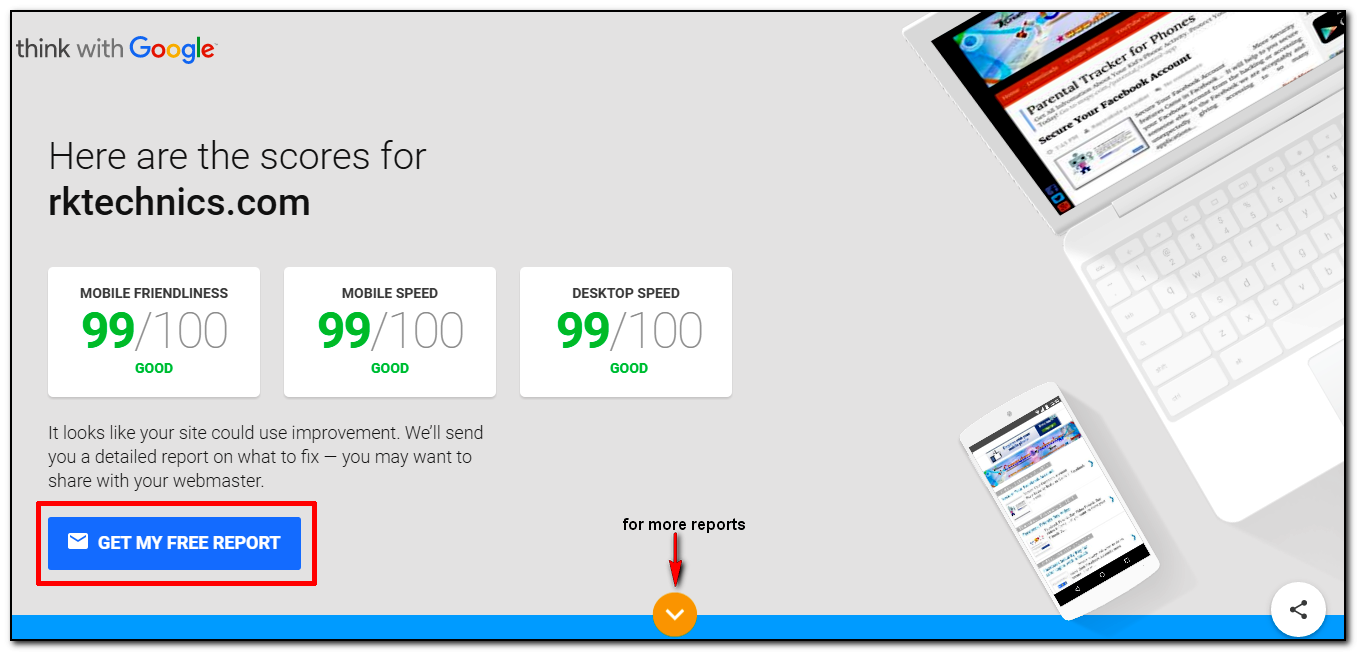
       Find out How well your website works across mobile and desktop computer devices. People are 6 times likely to leave or exit a website if it is not mobile-friendly. This is a way to test your website performance across all types of devices. this is very simple to test your website simply open the below link and enter your website URL and click on TEST NOW Button.
After Testing the score will be display about your website . so i am giving some points below about it. and if you want to get your report on your mail simple click on GET MY FREE REPORT
  • People are five times more likely to exit a mobile site that is not mobile-friendly performance.
  • Approx half of all visitors will leave or exit your mobile website if the pages don’t load within 3 seconds.
  • almost 9/10 people are say they use multiple tab screens for their tasks as booking or managing their personal banking
The world’s gone mobile. Now, it’s your turn. Hurry Up ! 

Thank You 

 Rayarakula Karnakar 
9014819428
rayarakula.karnakar@gmail.com


Sunday, December 11, 2016

RRB Results of NTPC (Graduate) posts against CEN No. 03/2015.

Railway Recruitment Board (RRB) has announced the RRB NTPC Result 2016 on its official website.The examination conducted on 2015.
Almost three lakh candidates from All Regions and have made it to the second stage examination scheduled to be held in January/ February.
To view your Result you need to Login to view your details of result of 1st Stage Examination (CBT) of NTPC (Graduate) posts against CEN No. 03/2015: Click Here
Above login page will show like as an Image given below.
                      →Simple you need to your Registration number as Username

                      →And Date of Birth As password
After login it will show directly your score card .. that means how many marks you gain .. and you also seen what is the cut off marks for your category
Region wise links have been given below. Click on any of the links to visit your region official website and know your result:
1.       Ahmedabad – rrbahmedabad.gov.in
2.      Ajmer Region Results: rrbajmer.gov.in
3.      Ajmer Region Results: rrbajmer.gov.in
4.     Bangalore – rrbbnc.gov.in
5.      Bhubaneshwar Region Results– rrbbbs.gov.in
6.     Bilaspur Region Results– rrbbilaspur.gov.in
7.     Chandigarh Region Results– rrbcdg.gov.in
8.     Chennai Region Results– rrbchennai.gov.in
9.     Gorakhpur Region Results– rrbgkp.gov.in
10.  Guwahati Region Results– rrbguwahati.gov.in
11.    Jammu Region Results– rrbjammu.nic.in
12.   Kolkata Region Results– rrbkolkata.gov.in
13.   Malda Region Results– rrbmalda.gov.in
14.  Mumbai Region Results– rrbmumbai.gov.in
15.   Muzaffarpur Region Results– rrbmuzaffarpur.gov.in
16.  Patna Region Results– rrbpatna.gov.in
17.  Ranchi Region Results– rrbranchi.org
18.  Secunderabad Region Results– rrbsecunderabad.nic.in
19.  Siliguri Region Results– rrbsiliguri.org
20. Trivendrum Region Results– rrbthiruvananthapuram.gov.in

Thursday, November 3, 2016

TSPSC Group II Hall Ticket Download

GROUP II HALL TICKET DOWNLOAD
TELANGANA STATE PUBLIC SERVICE COMMISSION:: HYDERABAD released 1,032 Group-2 Posts. In this month 11th and 13th the tests will be conducted.for the 1,032 posts the application was totally 7,89,985 received. this month 11 and 13th nov 2016 the exam will be started morning 10 :00AM To 12:30PM and 2:30PM To 5:00PM . On the date 11 nov 2016 Paper 2 and Paper 4 was conducted and another day 13th nov 2016 Paper 1 and Paper 3 was conducted by the govt rules. Totally there are 1911 Examinations centers was arranged in Telangana State.

There are some Warnings and Notes for who are ready to write exam to avoid the Malpractice.. 
those are 
  •  Do not Come with the wearing of Shoes .
  • Do not wear necklace,ear rings, Watches
  • Electronics Gadgets are Strictly Prohibited 
  • Note Books, Papers, Charts, wallets are not allowed


 If Your Sign is not clear in the Hall ticket then you should take two passport size photos. after full verification your allowed. The gates will be open 8.15 to 9.45 after 9.45 do not allow the applicants for the afternoon exam the gates will be open 1.15 and closed 2.15 so you should attend and wait before one hour. The Attendance will be taken by the Bio Metric type. and compared the photo and TSPSC application Photo So take some copies of photos.


We can use Blue or Black Ball Pen Do not use Jel or Ink pens.

To Download Your 
Group II Hall ticket Download : Click Here
To Download Your Group II Hall ticket Download : Click Here

This window will be Open then type your TSPSC OTR (one time registration ID) and Date of Birth the Your name was displayed now click on download button thats it your hall ticket shown.. Immediately print the Hall ticket and verify it. If have any error must report in the examination hall. verify your center name and one day before you must go and see the college which you should go there easily .


♥ All The Best ♥
for more updates must visit my website


Read post in Telugu : click here