Showing posts with label tricks and tips. Show all posts

Tuesday, May 2, 2017

Summer Shopping Days

Flipkart announces Wonderful offers for all products


Flipkart announces summer special offers for all products. And axis Bank offers. Extra 5% off on EMI on Cards, terms and conditions apply


And if you want to buy any some new products then this is the perfect time to buy some products. then why are you waste time search in the flipkart and choose some products ad to your kart.
And go though the payment . if you want to pay the amount when delivery then select cash on delivery and confirm it. Then ready to go with the click of below website link. do not go any other fake website please click below verified link 


Flipkart Website


Tuesday, April 18, 2017

Background Color in Facebook Post in PC

Background Color in Facebook Post in PC

Background Color of Facebook post is arrived in the Computer PC also. this is simple to post with the background color just click on whats on your mind, then choose an option of Background Color with the icon of Aa. there are almost 8 different colors. just choose any color and write post and post.
              Note: This Background color is not worked when you posted an Image or any Long matter or any links. 

Monday, December 12, 2016

SayThanks Video in Facebook

Say Thanks Video in Facebook 
    Lot of people use Facebook every day and every time to connect with the friends. Your friends are very closely by the Facebook experience, and Facebook always looking for connecting friends easily and giving lot of features and new ways celebrate our friendships. 

Now I am explaining an excited feature to Say Thanks to Your Friend, wonderful experience that lets you can create a personalized video cards and video for your friends on Facebook. Ya its really amazing to know deeply about this say thanks video then must read this post...
scroll down………
You can Share a Say Thanks video with a close friend, your other special person, a relative, a colleague, an old friend, a classmate or anyone else in your life who you did like to celebrate that friendship. There is no any limit to create many personalized videos you can create and share.
how it works:
To create a Say Thanks video to a friends, then must visit facebook.com/saythanks or facebook.com/thanks Once you choose a friend, Facebook will give a preview of the video. Which show the photos and post tagged with you and your friend. What ever may be tagged with your friend it will taken and generate directly a video. And you can have the ability to select different types of themes also to represent your friendship like as.  The three different types of themes are
1.    Old Friend
2.    Friend
3.    Family
These 3 themes will have different type of music for each one. And different type of cards in the video.
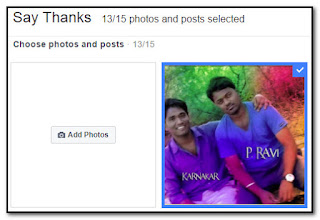
And there is a best feature available that is you can choose your photos or upload new one. Which one you select that photo will show in the preview of your say thanks video. You have chance to select 10 , 13 , 15 photos as per the photos which have been tagged with your friend.
 When you are done satisfied with the preview video, then you click on “Share Video” after that it generate a post and you have the option of writing a personalized matter before posting. The video will be post on your Timeline as well as your friend timeline will be tagged also, so that it will show up on Your Friend Timeline as well.
Say Thanks will be available globally on both desktop and mobile.
Thank You

Friday, November 18, 2016

Download Videos in Facebook

Download Videos in Facebook 

            Arrived a wonderful option for every one who are waiting for this option and asking to others.. Finally Facebook allows to us to download the time line videos. 

        Facebook Application directly given a option "Download(Size)" by pressing the options menu (three dots). this option is very useful for who are waiting for this options. now a days the videos are very virally spread by the Facebook and somebody attract by the video and they want that video but in previous days there is no option to download the videos so they visit the 3rd party websites and taking lot of steps of risking for download the video. 

             But we can download the video easily now.. the above image clearly showing how to download the time line videos .. 

important note: this option is now developing mode so some users do not have  this option or feature but don't worry it will enable soon 
            

Saturday, November 12, 2016

Whats app Two-Step Verification

Whats app Two-Step Verification
Whats App Two-step verification is an optional feature that can
adds more security to your Whats App account. When you enable the two-step verification, any another attempt to verify your mobile number number on Whats App Application must be accompanied by the six-digit pass code (you have chooses) that you created using this New feature.
To enable Whats App two-step verification 

Open Whats App Application → Settings → Account → Two-step verification → Enable 

While enabling this Two step verification feature, you can also enter your valid email address. Given email address will allow Whats App to send you a URL (link) to entered email Address to disable Two-Step verification in case you forget your 6-digit pass code, and also it is act as a safeguard to safe your whats app account ever. its highly recommend you Give a valid email address so that you are not locked out of your Whats App account if you forget your pass code.
Important Note: If you receive an email to disable two-step verification from whats app,but did not request this by you, don't click on the URL (link). Someone could be Trying to verify your phone number on Whats App. Its a hack Trick. Be careful
      If you have Two-step verification enabled on your account, your number will not be permitted to Disable Two Step Verification within a week of days on Whats App without your pass code. Thus, if you forget your own pass code, but did't Give an email Address to disable two-step verification, Even you will not be permitted to re verify on Whats App within A week(7) of days of last using Whats App. After completion of  these 7 days, your number will be permitted to re verify on Whats App Account without your pass code, but you will lose all pending messages upon re verifying they will be deleted. If your number is re verified on Whats App after a month(30) of days of last using Whats App Application, and without your pass code, your Whats App account will be deleted and a Fresh New one will be created after success of re verifying.
Important Note: To help you to never forgot your pass code, Whats App Application will  Random periodically ask you to enter your pass code. There is no more option to disable this without disabling the two-step verification feature.

Thursday, November 3, 2016

TSPSC Group II Hall Ticket Download

GROUP II HALL TICKET DOWNLOAD
TELANGANA STATE PUBLIC SERVICE COMMISSION:: HYDERABAD released 1,032 Group-2 Posts. In this month 11th and 13th the tests will be conducted.for the 1,032 posts the application was totally 7,89,985 received. this month 11 and 13th nov 2016 the exam will be started morning 10 :00AM To 12:30PM and 2:30PM To 5:00PM . On the date 11 nov 2016 Paper 2 and Paper 4 was conducted and another day 13th nov 2016 Paper 1 and Paper 3 was conducted by the govt rules. Totally there are 1911 Examinations centers was arranged in Telangana State.

There are some Warnings and Notes for who are ready to write exam to avoid the Malpractice.. 
those are 
  •  Do not Come with the wearing of Shoes .
  • Do not wear necklace,ear rings, Watches
  • Electronics Gadgets are Strictly Prohibited 
  • Note Books, Papers, Charts, wallets are not allowed


 If Your Sign is not clear in the Hall ticket then you should take two passport size photos. after full verification your allowed. The gates will be open 8.15 to 9.45 after 9.45 do not allow the applicants for the afternoon exam the gates will be open 1.15 and closed 2.15 so you should attend and wait before one hour. The Attendance will be taken by the Bio Metric type. and compared the photo and TSPSC application Photo So take some copies of photos.


We can use Blue or Black Ball Pen Do not use Jel or Ink pens.

To Download Your 
Group II Hall ticket Download : Click Here
To Download Your Group II Hall ticket Download : Click Here

This window will be Open then type your TSPSC OTR (one time registration ID) and Date of Birth the Your name was displayed now click on download button thats it your hall ticket shown.. Immediately print the Hall ticket and verify it. If have any error must report in the examination hall. verify your center name and one day before you must go and see the college which you should go there easily .


♥ All The Best ♥
for more updates must visit my website


Read post in Telugu : click here 

Wednesday, October 26, 2016

Internet Download Manager full version

            Fast Download , Resume Capability, Multi Downloads etc etc.... These all features are available in the Internet Download Manager (IDM). every internet user must need this software But This is a Paid version not for free

Then How.
don't worry I am(Rayarakula Karnakar) Here to Support to you. So I am providing IDM full version for Free.. but Do not forgot me and my website rktechnics. please visit regular


Ok, Coming to Point First of all You need to download the
After Installation Exit the The Internet Download Manager IDM from Tray Icons or End task in Task manager. Now finally we need to do it Full version. Now have a small processes don't worry I will tell clearly in this post . 

Download this Internet Download Manager Crack this file will help to get full version of IDM. we need to replace the main application file to this file. 

Crack file Link : Click Here

after downloading this IDMan.rar Extract with winrar there you found a IDMan.exe file now 
Go to  
c:\Programe files\Internet Download Manager\ 
and Paste there

when you paste the IDMan.exe file in the installation folder 
It will show like this image Dont worry simply click on
Replace the file Destination


Now it will show like this image simply click on continue button to confirm paste the file into the installation folder. Finally finished Done a great job. Now open the internet download manager. It will never ask Registration again and again and do not show the licence expired warning and do not show the trail version information any more. Enjoy the Software Keep Downloading
 Have any problems in doing this proccess do not skip please comment or message me 
My Facebook : Rayarakula karnakar